
Introduction
Slow internet at home can make everyday activities frustrating. Videos buffer during streaming, online games lag, websites load slowly, and video calls freeze at important moments. Whether you work from home, attend online classes, watch movies, or browse social media, poor internet speed affects both productivity and entertainment.
FOR MORE SOLUTIONS VISIT
Many people assume slow internet is always caused by their service provider, but that is not always true. Weak WiFi signals, outdated routers, network congestion, and poor setup are often the real reasons behind speed problems.
The good news is that improving home internet speed does not always require expensive upgrades. In many cases, simple adjustments to your router placement, device management, and network settings can make a noticeable difference.
This guide explains practical and beginner-friendly methods for home internet speed improvement that actually work.
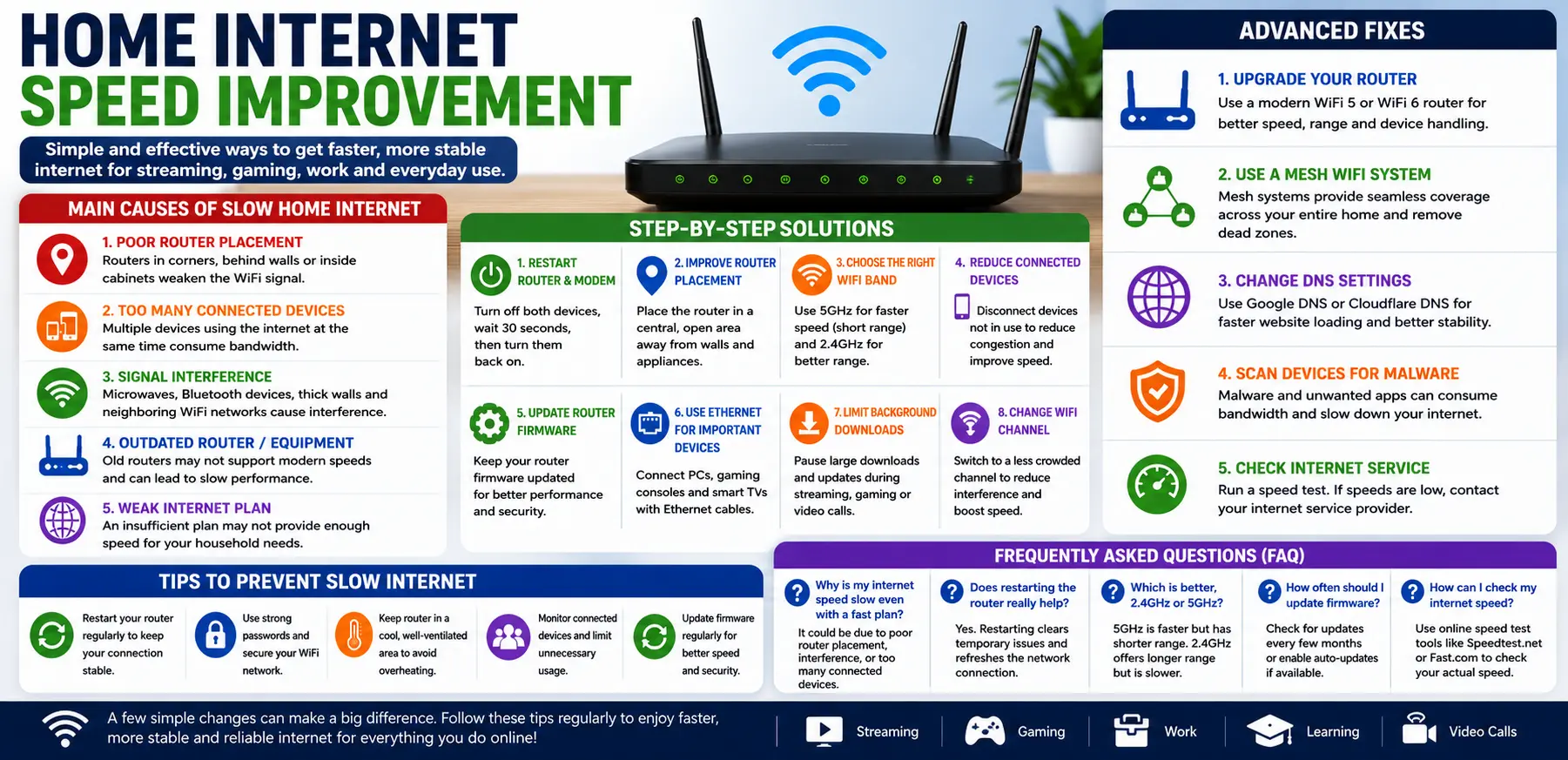
Main Causes of Slow Home Internet
1. Poor Router Placement
Router location greatly affects internet speed and signal strength. If the router is placed behind walls, inside cabinets, or near metal objects, WiFi signals become weaker.
Signals spread better in open and elevated areas.
2. Too Many Connected Devices
Modern homes often connect many devices to the same network:
- Smartphones
- Laptops
- Smart TVs
- Gaming consoles
- Security cameras
Too many active devices sharing bandwidth can slow the internet for everyone.
3. Outdated Router or Equipment
Older routers may not support modern internet speeds efficiently.
Outdated networking hardware can cause:
- Slow speeds
- Weak coverage
- Frequent disconnections
4. Signal Interference
WiFi signals can be affected by:
- Thick walls
- Microwaves
- Bluetooth devices
- Neighboring WiFi networks
Interference reduces speed and stability.
5. Weak Internet Plan
Sometimes the internet package itself may not provide enough speed for your household needs.
Streaming 4K content, gaming, and video conferencing require faster and more stable connections.
Step-by-Step Solutions
Restart the Router and Modem
Restarting networking equipment is one of the simplest and most effective troubleshooting methods.
Steps:
- Turn off the modem and router
- Wait about 30 seconds
- Turn the modem back on
- Wait for connection lights to stabilize
- Turn on the router
This refreshes the connection and clears temporary network issues.
Improve Router Placement
Moving the router to a better location can significantly improve internet speed and coverage.
Best Placement Tips:
- Place the router in a central area
- Keep it elevated
- Avoid placing it near appliances
- Keep it away from thick walls and metal objects
Open spaces usually provide better signal coverage.
Switch Between 2.4GHz and 5GHz
Most modern routers support two WiFi bands.
2.4GHz
- Longer range
- Better through walls
- Slower speed
5GHz
- Faster speed
- Shorter range
- Better for gaming and streaming
Choose the best band depending on your location and usage.
Disconnect Unused Devices
Devices connected to the network continue using bandwidth even when idle.
Disconnect:
- Old smartphones
- Unused tablets
- Idle gaming systems
- Smart devices not in use
Reducing congestion can improve overall speed.
Update Router Firmware
Router manufacturers release firmware updates to improve:
- Performance
- Stability
- Security
- Device compatibility
Check the router settings regularly for updates.
Use Ethernet for Important Devices
WiFi is convenient, but wired connections are usually faster and more stable.
Use Ethernet cables for:
- Gaming consoles
- Desktop PCs
- Smart TVs
- Work computers
This reduces wireless traffic and improves WiFi performance for other devices.
Limit Background Downloads
Large downloads and automatic updates may slow the network for everyone else.
Pause:
- Cloud backups
- Software updates
- Game downloads
during important activities like video calls or streaming.
Advanced Fixes
Upgrade Your Router
Older routers may struggle with modern internet usage and multiple devices.
Upgrading to:
- WiFi 5
- WiFi 6
routers can improve:
- Speed
- Coverage
- Stability
- Device handling
This is especially useful for large households.
Use a Mesh WiFi System
Large homes often have weak signal areas called dead zones.
Mesh WiFi systems provide:
- Better coverage
- More stable signals
- Seamless room-to-room connectivity
They are more effective than traditional extenders in many cases.
Change WiFi Channel
Nearby networks may use the same WiFi channel, causing interference.
Switching to a less crowded channel can improve:
- Speed
- Stability
- Signal quality
Most routers allow manual channel selection.
Change DNS Settings
DNS settings affect how quickly websites load.
Popular DNS providers include:
- Google DNS
- Cloudflare DNS
Changing DNS settings may improve browsing responsiveness.
Scan Devices for Malware
Malware or infected devices may secretly consume internet bandwidth.
Use trusted antivirus software to scan:
- Computers
- Smartphones
- Tablets
Removing harmful software may improve network performance.
Tips to Prevent Slow Internet Problems
Restart Your Router Occasionally
Restarting the router every few weeks helps refresh the connection and maintain stable performance.
Keep Firmware Updated
Firmware updates improve:
- Speed
- Security
- Compatibility
Enable automatic updates if supported.
Secure Your WiFi Network
Use:
- Strong passwords
- WPA2 or WPA3 encryption
Unauthorized users can reduce available bandwidth.
Avoid Router Overheating
Routers may slow down when overheated.
Keep the router:
- In a cool area
- Well ventilated
- Away from direct sunlight
Monitor Connected Devices
Check your network regularly to see which devices are connected.
Too many active devices can reduce internet speed significantly.
FAQs
Why is my home internet suddenly slow?
Sudden slowdowns may happen because of network congestion, signal interference, outdated routers, or internet provider issues.
Does restarting the router improve speed?
Yes. Restarting refreshes the network connection and often fixes temporary speed problems.
What is better: 2.4GHz or 5GHz WiFi?
2.4GHz offers longer range, while 5GHz provides faster speeds over shorter distances.
Can too many devices slow down home internet?
Yes. Multiple devices sharing bandwidth can reduce speed and increase network congestion.
How often should I replace my router?
Most routers perform well for around 4–5 years before newer technology provides noticeable improvements.
Conclusion
Slow internet can affect work, entertainment, gaming, and communication, but many speed problems can be solved with simple adjustments. Improving router placement, reducing interference, updating equipment, and managing connected devices can greatly improve internet performance.
Advanced solutions like mesh systems, upgraded routers, and optimized settings can provide even better results for larger households and heavy internet users.
By following these home internet speed improvement tips, you can enjoy a faster, smoother, and more reliable internet experience throughout your home.
- AI Powered Cyber Defense How Artificial Intelligence Strengthens Modern Cybersecurity
- Machine Learning in Cybersecurity How Intelligent Systems Help Detect and Prevent Cyber Threats
- AI in Cybersecurity How Artificial Intelligence Is Transforming Digital Security
- AI Threat Detection How Artificial Intelligence Helps Stop Cyber Threats Before They Cause Damage
- Artificial Intelligence Security Solutions A Practical Guide to Smarter Cyber Protection
