
Introduction
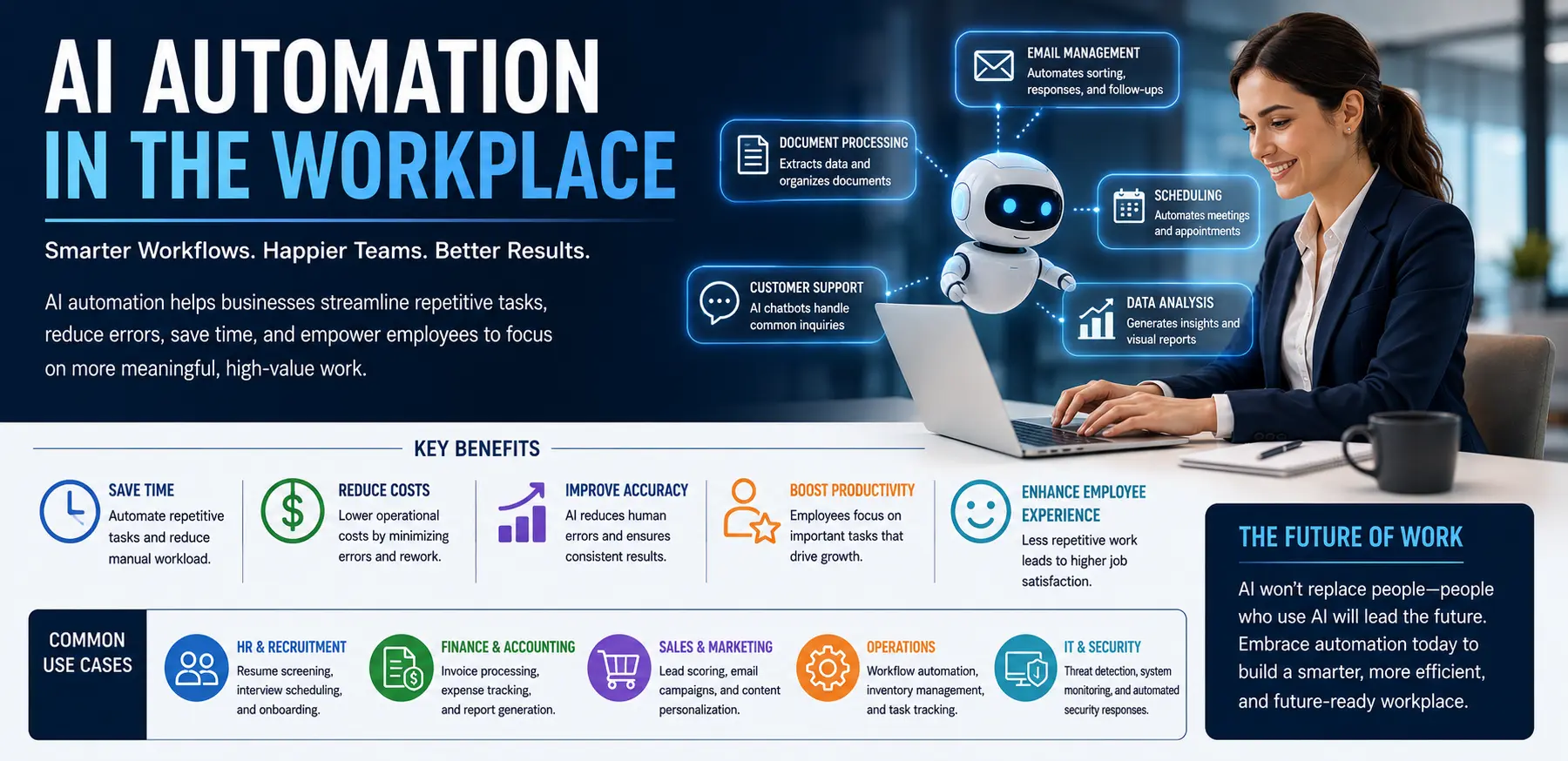
Businesses are constantly looking for ways to improve productivity, reduce costs, and help employees focus on more meaningful work. Yet many organizations still spend countless hours on repetitive tasks such as data entry, scheduling, report creation, customer support, and document management. These routine activities often slow down operations and limit overall efficiency.
As companies grow, manual processes become harder to manage. Employees may find themselves overwhelmed with administrative work instead of focusing on problem-solving, innovation, and customer relationships. This can lead to lower productivity, increased operational costs, and employee frustration.
This is where AI Automation in the Workplace is making a significant difference. Artificial intelligence can automate repetitive processes, analyze large amounts of data, and assist employees with everyday tasks. Rather than replacing workers, workplace automation often helps teams complete their work faster and more accurately.
Understanding how AI automation works, why businesses are adopting it, and how to implement it effectively can help organizations improve performance while creating a more productive work environment.
Main Causes Driving AI Automation in the Workplace
Growing Workloads and Administrative Tasks
Many employees spend a large portion of their day performing repetitive administrative work. Tasks such as entering data, updating records, generating reports, and managing schedules consume valuable time.
As businesses expand, these responsibilities increase, creating a strong need for automation solutions.
Demand for Higher Productivity
Organizations are under constant pressure to achieve more with limited resources.
AI automation allows businesses to streamline workflows, reduce manual effort, and improve overall efficiency without significantly increasing staffing costs.
Increasing Data Volumes
Modern companies generate enormous amounts of information every day.
Processing and analyzing this data manually is often impractical. AI systems can quickly identify patterns, summarize findings, and provide useful insights for decision-makers.
Customer Expectations for Faster Service
Customers expect quick responses and seamless experiences.
AI-powered automation helps businesses respond faster through chatbots, automated ticket systems, and intelligent customer service tools.
Labor Shortages in Certain Industries
Many industries face staffing challenges that make it difficult to manage growing workloads.
Automation helps organizations maintain productivity even when recruiting skilled workers becomes difficult.
Step-by-Step Solutions for Implementing AI Automation in the Workplace
Step 1: Identify Repetitive Tasks
The first step is understanding where employees spend the most time on repetitive activities.
Common examples include:
- Data entry
- Appointment scheduling
- Invoice processing
- Customer inquiries
- Report generation
- Document organization
Automating these tasks often delivers immediate productivity improvements.
Step 2: Choose the Right AI Tools
Not every business requires the same automation solutions.
Popular workplace automation tools include:
- AI chatbots
- Workflow automation platforms
- Virtual assistants
- Document processing software
- Predictive analytics tools
Select tools that address specific business challenges rather than adopting technology simply because it is popular.
Step 3: Start with Small Projects
Large-scale automation projects can be difficult to manage initially.
Begin with a single department or process.
For example:
- Automate customer support ticket routing
- Use AI for meeting summaries
- Implement automated invoice processing
Small successes help organizations gain confidence and identify best practices.
Step 4: Train Employees Properly
Successful automation depends on employee adoption.
Provide training that explains:
- How the tools work
- Their benefits
- Limitations
- Best practices
Employees who understand automation are more likely to use it effectively.
Step 5: Monitor Results and Improve
Automation is not a one-time project.
Organizations should regularly evaluate:
- Productivity improvements
- Cost savings
- Employee satisfaction
- Customer feedback
- System accuracy
Continuous monitoring ensures long-term success and identifies opportunities for further improvement.
Advanced Fixes and High-Value AI Automation Strategies
Intelligent Workflow Automation
Basic automation handles simple tasks, while intelligent automation manages more complex workflows.
For example, an AI system can:
- Receive a customer request
- Analyze the request
- Route it to the correct department
- Draft a response
- Track progress until completion
This reduces manual involvement across multiple stages.
Predictive Analytics for Business Decisions
AI automation can help businesses predict future trends.
Applications include:
- Sales forecasting
- Inventory planning
- Customer behavior analysis
- Risk management
Predictive systems allow organizations to make proactive decisions instead of reacting to problems after they occur.
AI-Powered Human Resources Management
Human resources departments are increasingly adopting automation.
AI can assist with:
- Resume screening
- Interview scheduling
- Employee onboarding
- Training recommendations
- Performance analysis
This helps HR teams focus more on employee engagement and organizational development.
Automated Knowledge Management
Many businesses struggle to organize internal information.
AI-powered knowledge systems can:
- Search company documents
- Summarize policies
- Answer employee questions
- Recommend relevant resources
Employees spend less time searching for information and more time completing meaningful work.
Process Mining and Optimization
Advanced AI systems can analyze how work is actually performed within an organization.
These tools identify:
- Bottlenecks
- Delays
- Redundant tasks
- Inefficient workflows
Businesses can then optimize operations based on real-world data rather than assumptions.
Tips to Prevent Common AI Automation Challenges
Maintain Human Oversight
Automation should support employees rather than completely replace human judgment.
Critical decisions should always include human review when necessary.
Keep Data Accurate
AI systems rely heavily on quality data.
Regularly review and update business information to ensure accurate outputs and reliable automation.
Avoid Over-Automation
Not every task should be automated.
Processes requiring creativity, empathy, negotiation, or strategic thinking often benefit from human involvement.
Protect Employee Privacy
Organizations should establish clear guidelines regarding data collection and monitoring.
Transparency helps build trust among employees.
Review Performance Regularly
Automation systems should be evaluated frequently.
Track:
- Accuracy rates
- Processing times
- Customer satisfaction
- Employee feedback
Regular reviews help identify areas for improvement before issues become significant.
FAQs
What is AI Automation in the Workplace?
AI Automation in the Workplace refers to the use of artificial intelligence technologies to automate repetitive tasks, improve efficiency, support decision-making, and streamline business operations.
Will AI automation replace human employees?
In most cases, AI automation is designed to assist employees rather than replace them entirely. It handles repetitive tasks so workers can focus on higher-value activities that require creativity, communication, and problem-solving.
Which departments benefit most from workplace automation?
Customer service, human resources, finance, marketing, operations, and IT departments often see significant benefits from automation technologies.
Is AI automation expensive to implement?
Costs vary depending on the solution. Many cloud-based AI tools offer affordable subscription plans that make automation accessible to businesses of all sizes.
How can small businesses start using AI automation?
Small businesses can begin by automating simple tasks such as appointment scheduling, customer support, email responses, and document management before expanding to more advanced applications.
Conclusion
AI Automation in the Workplace is transforming how organizations operate by reducing repetitive work, improving efficiency, and helping employees focus on more valuable responsibilities. Businesses across industries are using automation to streamline workflows, improve customer experiences, and make better use of their resources.
Successful implementation starts with identifying repetitive tasks, selecting appropriate tools, training employees, and continuously monitoring performance. Organizations that approach automation strategically can achieve meaningful productivity gains while maintaining a positive workplace culture.
As AI technology continues to advance, companies that embrace responsible automation will be better positioned to adapt to changing business demands and create sustainable long-term growth.
- Future of Artificial Intelligence Industry Trends Opportunities and Challenges Ahead
- Enterprise AI Solutions How Businesses Use Artificial Intelligence to Improve Efficiency and Growth
- AI Automation in the Workplace Benefits Challenges and Practical Implementation Strategies
- Generative AI Business Applications How Companies Are Using AI to Improve Productivity and Growth
- Artificial Intelligence Trends 2026 Key Innovations Shaping the Future
